
Test log entry
Astute Beta Activation Code: How to Get One and Fix Code Errors
How to get an Astute Beta activation code, enter it on Android, and fix invalid, used, or expired code errors without falling for fake generators.
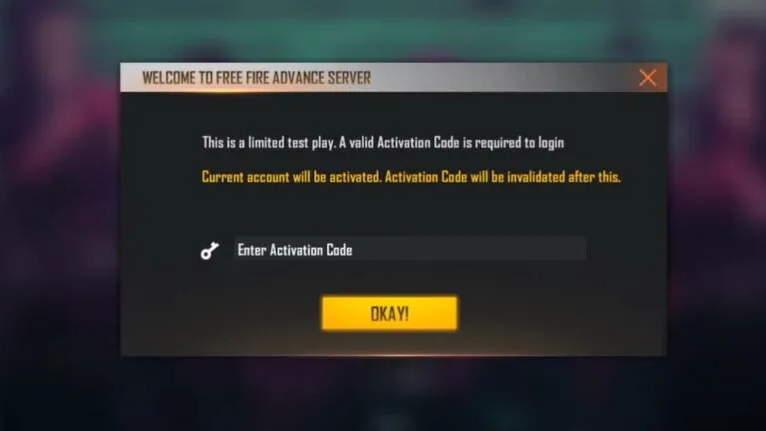
Why the test chamber asks for a code
Astute Beta (FF Beta) is a closed test build, so entry is controlled with a short activation code. Think of the code as your tester badge: it proves you registered during the current test window, and it unlocks the login screen before anything else. The Astute Beta homepage always links the current build, but the code itself never comes from a download page. It comes from the official registration channel only, which is why the download and the code arrive through two different steps.
Where testers actually get a code
Registration opens for a limited window before each test cycle, and it closes when the tester slots fill up. You submit your account details through the official sign-up form, and if your entry is accepted, the code is delivered to the account or inbox you registered with. There is no public list of codes anywhere, and there is no legitimate seller. Any website or seller offering codes for money or in exchange for your login is running a scam, so report the page and walk away.
How to enter the code on your phone
Install the build first, then open it on the phone you plan to test on. The welcome screen asks for the code before any login option appears, with a single input field and a confirm button. Type the code exactly, character for character, then submit. Watch out for lookalike characters like zero and the letter O, and the letter I and the number one. If the install itself is fighting you, this Astute Beta installation troubleshooting walkthrough covers the failures that block the welcome screen entirely.
Codes are not instant: why you have to wait
After you register, codes go out in batches rather than all at once, so waiting a day or two after acceptance is completely normal. The test team approves entries in waves, and the delivery queue moves at its own pace. Do not register five times with five different accounts to speed things up. Duplicate entries get flagged, and flagged accounts can lose their place in the queue altogether. One registration, then patience.
Invalid code: the three usual causes
First, typos, which are behind most invalid code errors. Retype the code slowly and compare it character by character against what you received. Second, cycle mismatch. Codes belong to a specific test window, and a code issued for a previous cycle will not work in the current one. Third, the code is already used. Every code is single use, so if someone else entered it before you, whether by accident or because you shared it, the code is dead for everyone.
The one-device rule and code already in use
Most codes bind to the first account and device that redeem them. That binding is deliberate: it stops one code from spreading across an entire group chat. The practical effect is that switching phones, or wiping the phone with a factory reset, usually means requesting a fresh code for the new setup. Keep the phone you registered on as your test device for the whole cycle. If the gate is fighting you and you just want to try the build casually, the Astute Beta guest mode walkthrough shows the path with the least friction.
Fake code generators: do not touch them
No working code generator exists for any FF Beta test cycle, past or present. The apps, websites, and videos promising unlimited free codes exist to harvest logins or push malware onto your phone. Some ask for your main game account details, which is exactly what the scammers want. Get your code only through the official registration channel, and treat any code sent to you over chat as already used or stolen.
After the code is accepted
Once the welcome screen accepts your code, the login options unlock and you land inside the test build. From here it behaves like a normal install, with one big exception: your progress can reset when the next test cycle begins, so treat everything as temporary by design.
Finally, treat the code like a password. Do not share it, post screenshots of it, or sell it. When the next cycle opens, register again through the normal channel and read the Astute Beta test content overview to see what is worth testing first.
Quick answers
How do I get an Astute Beta activation code?
Register during the official sign-up window for the current test cycle. If your entry is accepted, the code is delivered to the account or inbox you registered with. There is no other legitimate source.
Why does my Astute Beta code say invalid?
Usually a typo, a code from a previous test cycle, or a code that was already used. Retype it carefully and confirm it belongs to the current cycle.
Can I use the same activation code on two phones?
No. Codes are single use and usually bind to the first account and device that redeem them. A new phone or a factory reset normally needs a fresh code.
Do activation codes expire?
Yes. Codes belong to one test cycle and stop working when that cycle ends. Register again for the next cycle through the official channel.

Arjun Mehta
Free Fire Beta Tester
Arjun tests Free Fire beta builds on real Android devices, verifying install behavior, server status, and every claim before it reaches readers.
Full profile →